
Step 6: Reply to customers in the Agent Workspace
1. Overview
Once accounts are logged in, the direct messages customers send to those accounts all arrive in the Agent Workspace. Agents reply from one place here; incoming foreign languages come with a translation automatically, and common phrasings can be saved as canned replies and sent in one click.
2. Steps
1. How do I open the Agent Workspace?
① From the admin console, the primary account clicks its name in the top-right > Enter Agent Workspace; agents log in at app.xiongmaoscrm.com by clicking Enter the Agent System.
2. How do I reply to a customer?
① In the account rail on the left, click an account (or All), and the conversation list shows its direct messages, with a number on any that have unread messages.
② Click a conversation, type in the input box at the bottom, and press Enter to send; press Shift + Enter for a new line.
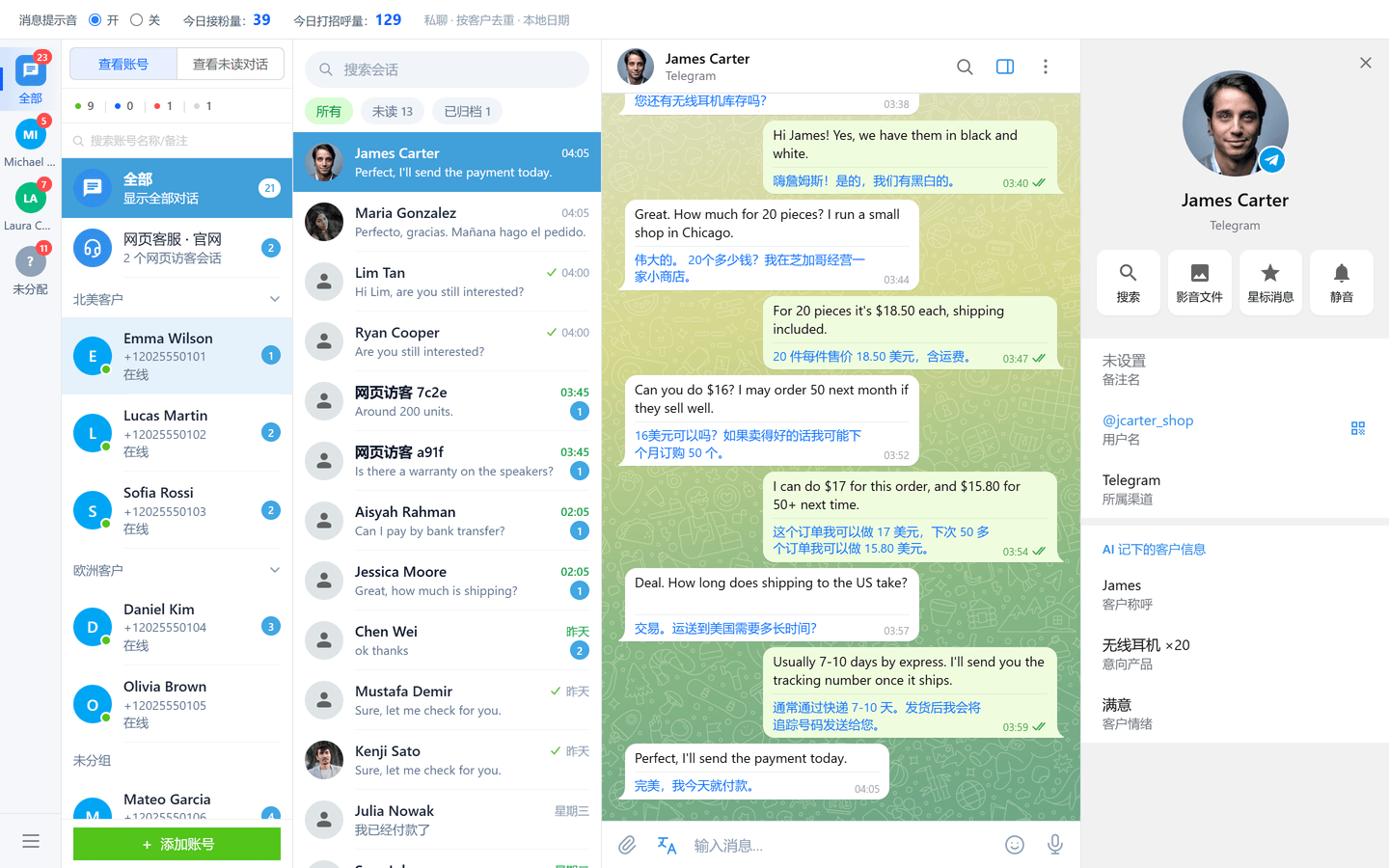
③ When a customer speaks a foreign language, a translation is added automatically below the incoming message. To translate your reply into the customer's language before sending, click the Translate button to the left of the input box and set Their language. See Translating the customer's language for details.
④ Common phrasings can be saved as canned replies: click the three-line menu in the lower-left > Canned Replies; single-click to drop one into the input box, double-click to send it directly. See Using canned replies for details.
3. We recommend turning on new-message alerts first
① Click the three-line menu in the lower-left > Settings > Notifications & Sounds, and turn on Sound Alerts and Desktop Notifications.
② When the browser asks whether to allow notifications, click allow.
Note: If the account a conversation belongs to goes offline, a prompt above the chat box says the account is offline and messages can't be sent; for how to handle this, see How do I handle an account that is offline, frozen, or banned?
For more detail, see Quick start: Agent Workspace.
Thanks for the feedback!
Still stuck? Reach us directly: Telegram @scrmqiye001 or email [email protected]
Last updated: